Workplace & Security

People sign in safely and reach only what they should.

Fewer open doors, access that ends when a role ends, devices ready on day one and shared files with an owner. When the platform itself has to change, the move is planned and checked.

First conversation free. Scope and price in writing before any access.

Delivered on Microsoft 365.

Completed project: SharePoint migration troubleshooting

A change, acceptedIllustration

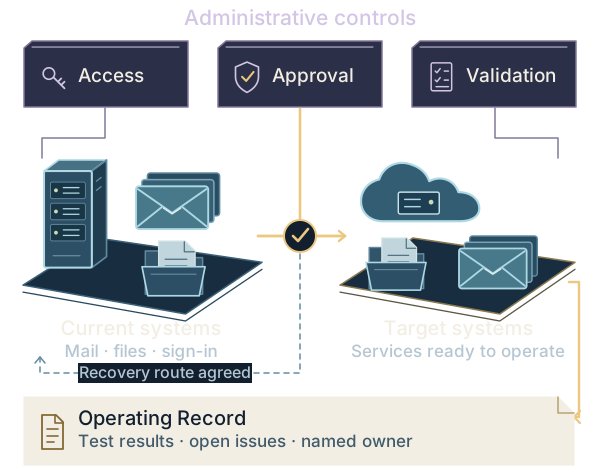
Administrative controls for access, approval and validation above a Microsoft 365 workplace: a server and mailboxes moving to the cloud, the recovery route agreed, and the operating record with test results, open issues and a named owner.

Tested firstAccess, approval and validation controls sit above the move. The recovery route is agreed before mail and files change, and the operating record with test results, open issues and a named owner is what your team keeps.

Seven kinds of job

What needs to work better?

Each job has its own checks and its own handover. Choose the one that matches what is happening; the map shows how they fit together.

Give access an owner, a review date and an end.

Define and configure agreed access requests, reviews, lifecycle rules and privileged access.

You keepAn access model, configured controls and ownership instructions.

Delivered on Microsoft Entra ID Governance

Illustrative workplace · what a scoped configuration covers
People and their roles
  • DevicesReady on day one
  • Sign-inOnly the right people get in
  • Private appsReached without a VPN
  • Teams & filesEvery space has an owner

What you getAgreed settings and access rules, tested, with instructions your team can follow.

Completed project · Migrations

Finding the gaps after a file migration.

After a move to SharePoint, file differences and access issues needed investigation. Sync behavior and long project paths were part of the problem.

Work
Investigated sync and path problems, compared original and migrated files, and documented fixes and migration settings.
Handover
A System guide covering the migration setup, file comparison scripts, check results and a list of unresolved issues.

Anonymized completed project. Some exceptions remained; the reports do not show that every file was recovered.

First conversation free. Scope and price in writing before any access.

Inside the handover

Your system,
explained.

System guide · what this handover contained

  1. 01Migration setup
  2. 02File comparison scripts
  3. 03Check results
  4. 04Unresolved issues

Constructed file-check record · example paths only

01 Source
Projects / Sample project / Drawing register.pdf
02 Intended destination
SharePoint / Projects / Drawing register.pdf
03 Observed discrepancy
Transfer held: the source path needs an approved technical rename.
04 Recorded action · open
Owner to approve the rename and identify affected links. Retain the old/new path mapping and recheck transfer and access.
This constructed row is separate from the completed project described alongside it. No client files or paths are displayed.
Try a sample file check

Illustrative sample · constructed example

A path exception needs an action, not a green total.

Reconciliation excerpt · constructed project folder

Selected check

Has the path exception been corrected and the destination checked?

File transfer / exception recordIllustrative
File transfer / exception record: constructed inspection record
RecordEvidence or responsibilitySample review
Source itemProjects / Sample project / Drawing register.pdfPath exception open
DestinationSharePoint / Projects / Drawing register.pdfTransfer awaiting correction
AccessProject member allowed; unrelated pilot user denied.Test pending
Existing linksKeep the old-to-new path and links needing an update.Owner review required

This is one constructed item. No total migrated, success percentage or client file is represented.

Evidence
The source path needs an approved technical rename before transfer.
Decision
Keep the exception open
Next action
Owner approves the rename and identifies links that need updating.

Constructed row using the documented reconciliation method. It is not a recovered client file or an aggregate success rate.

01 · Security hardeningFewer open doors: what gets fixed, tested and handed overChecked: sign-in rules, administrator rights, app permissions and sharing exceptionsYou keep: enforced settings, test results and an exception register

Microsoft 365 security hardening

Turn agreed security settings into enforced controls.

Fix the selected sign-in, administrator, sharing and application-consent gaps. Test changes before enforcement and record the exceptions that remain.

Illustrative change record · not a tenant assessment
Control to addressAgreed change
Sign-in policy left in report-onlyPilot checked → enforce
Administrator rights without a clear ownerReview → reduce or document
Unused app with permissionsConfirm owner → revoke approved grants
Sharing exceptions nobody reviewsBound access → assign a review date

Every approved change gets a test result and a change record.

What AZ does

  1. Inventory the agreed controls and approve the target settings with your owners.
  2. Stage and test changes, including user impact and recovery access.
  3. Apply the approved configuration and hand over the policy register, tests and exceptions.
See the security hardening scope

Scheduled hardening. Incident response, continuous monitoring and a wider data-protection program have separate scopes. Features depend on your licenses.

Microsoft guidance on Microsoft 365 security
02 · Identity governanceAccess that ends when it should: how it is set upChecked: who requests access, who approves it, when it is reviewed and when it is removedYou keep: the access model, configured controls, a test record and instructions for owners

Identity governance · Microsoft Entra

Make access follow the person’s role, and end when it should.

Give employee, guest and administrator access a defined request, approval, review and removal process. Start with the people, applications and roles in scope.

Illustrative access lifecycle · configured for the agreed scope
  1. JoinRequest access to the agreed apps and groups.
  2. ApproveAn owner approves the access package and duration.
  3. Change or reviewRecheck access when roles change or a review is due.
  4. Leave or expireRemove agreed access and check the result.

Administrator access has its own rules. Scope eligible roles, activation and review through Privileged Identity Management (PIM).

What AZ does

  1. Map access owners and the employee, guest and privileged-role lifecycle.
  2. Configure the agreed access packages, reviews, lifecycle workflows or PIM controls.
  3. Test approval, role-change and removal cases with your owners.

You keepThe access model, configured control register, test record and instructions for owners and reviewers.

Discuss identity governance

HR sources, app provisioning, removal rules and license requirements are agreed first. This does not automatically manage every application or replace your business’s approval decisions.

Microsoft guidance on Entra ID Governance
03 · Private application accessReach internal apps without a VPN: how the pilot proves itChecked: the connector, the client, app assignment, and both permitted and denied accessYou keep: the connection map, configuration record, pilot results and operating instructions

Microsoft Entra Private Access

Connect the approved user to the private application.

Scope access to named internal applications and resources. Configure the connection and access rules, then prove the path with a pilot before a wider rollout.

Illustrative connection · policy and network dependencies simplified
User + deviceGlobal Secure Access client
Microsoft Entra Private AccessApp assignment + Conditional Access

Private network

Private network connectorOutbound connection to the service
Agreed internal applicationIts existing permissions still apply

What AZ does

  1. Confirm applications, users, DNS, network reachability and licensing.
  2. Configure connectors, client deployment, app assignments and approved access policies.
  3. Test permitted and denied access, troubleshoot the pilot and agree the next rollout group.

You keepThe application and connection map, configuration record, pilot results and operating instructions.

Discuss a Private Access pilot

Entra Private Access is a separate capability with license and deployment prerequisites. App compatibility and client support are checked first; a pilot does not promise replacement of every VPN use case.

Microsoft guidance on Entra Private AccessConnector prerequisites and deployment
When the whole platform has to move

Connected systems and complex moves

Review the dependencies before a major change.

Choose the project that matches the change ahead. Each scope sets out the work, the approvals needed, the documents you keep and the checks required for completion. Further work needs a separate agreement.

Illustrative sample · constructed example

A useful finding has evidence and a next action.

Review excerpt · privileged access ownership

Selected check

Has the client confirmed who owns this access?

Estate review / finding to decisionIllustrative
Estate review / finding to decision: constructed inspection record
RecordEvidence or responsibilitySample review
Privileged assignmentKeep the assignment reference and evidence date.Assignment observed
Purpose and ownerVerify why the access exists and who owns it.Owner unknown
Next decisionAgree whether a separately scoped change is needed.Evidence gap
ProductionRecord the review without changing access.No settings changed

The review produces a decision and record. Any implementation needs its own agreed scope.

Evidence
Role assignment is present; purpose and accountable owner are unresolved.
Decision
Record an evidence gap
Next action
Ask the client to confirm purpose, ownership and the appropriate next review.

Illustrative sample. This review produces decisions and a record; it does not change production settings.

Assessment

Hybrid Identity & Privileged Access Review

A sign-in change or acquisition has raised questions about which directory manages accounts and who has administrator access.

Decision
Which account sources, sign-in connections and administrator permissions should stay, change or be removed?
What is included
Review the agreed directories, synchronization, federation, administrator access, applications and recovery requirements. This is a review; changes to live systems are scoped separately.
What your team keeps
A map of account ownership and sign-in connections, access findings, recovery requirements and a prioritized design recommendation.
Complete when
The agreed account and sign-in paths have been reviewed. Findings, missing evidence, priorities and design recommendations are recorded and reviewed with named owners.
After the decision is approved

Approved identity corrections, federation exit or application modernization under a separately defined scope.

Illustrative sample · constructed example

Moving the mailboxes does not retire the last dependency.

Exchange Online path · application relay before server retirement

Selected check

Does the warehouse printer still depend on the server?

Exchange exit / retirement dependenciesIllustrative

Exchange Online path · application relay before server retirement

MailboxesAgreed mailbox move checked in Exchange Online.
Identity and relayDirectory authority, printers, applications and archives still need owners.
Server retirementRetirement waits for approved dependency and recovery checks.
Exchange exit / retirement dependencies: constructed inspection record
DependencyWhat has to be establishedSample review
MailboxesCheck the agreed move to Exchange Online.Move checked
Printer relayVerify the replacement sending route with the printer owner.Old server still referenced
Directory authorityConfirm how identities will be managed after the change.Separate review required
Archives and retirementResolve archive dependencies and approve retirement steps.Retirement not approved

One successful relay test cannot authorize the server retirement.

Evidence
Printer configuration names the Exchange server as its mail relay.
Decision
Do not retire the server
Next action
Agree a supported replacement route with the application owner.

Illustrative Exchange Online destination. The alternative Exchange Server Subscription Edition path is scoped separately. A relay test does not prove that directory or archive dependencies are resolved.

Program

Exchange Retirement & Mail Migration

Exchange must retire, but applications, relay, recipient management or shared access still depend on it.

Decision
What must change before the legacy messaging path can be switched off?
What is included
Review the agreed mail systems, account management, domains, DNS, certificates, application mail and connectors. Plan the pilot and cutover with approval checks and recovery limits.
What your team keeps
A mail-system map, a plan for each application that sends email, pilot and cutover steps, mail-flow tests and the server-retirement decision.
Complete when
The agreed sign-in and mail-flow tests pass. Remaining issues have an agreed action and owner before server retirement is approved.
After the decision is approved

Source retirement and transfer of the accepted messaging runbook after the exit decision is approved.

Illustrative sample · constructed example

Follow one person across both tenants.

Illustrative merger · project coordinator

Selected check

Is the domain transition agreed on both sides?

Tenant transition / workload acceptanceIllustrative

Illustrative merger · project coordinator

Source tenantThe coordinator has a mailbox, OneDrive and project Team access.
Shared dependenciesDomain release, identity matching and coexistence have separate gates.
Target tenantThe same person tests each agreed workload in its destination.
Tenant transition / workload acceptance: constructed inspection record
RecordEvidence or responsibilitySample review
Domain and identityBoth owners agree the domain release and sign-in timing.Transition not approved
MailboxTest the person’s sign-in and agreed mailbox in the target.Target account exists
Project TeamCheck membership and the user’s actual task separately.Access review pending
OneDriveVerify its agreed migration path and acceptance record.Separate workload check

Accept each workload on its own evidence; tenant access alone does not complete the move.

Evidence
Target account exists; domain release and sign-in timing are not approved.
Decision
Hold the affected wave
Next action
Both tenant owners agree the transition and user communication.

Illustrative sample. Workloads have different migration paths; a mailbox result is not a Teams or OneDrive result.

Program

Tenant Separation & Consolidation

A separation, acquisition or consolidation puts a date against tenant, domain and ownership decisions.

Decision
Which accounts, applications and data move or stay, and who signs off on the result?
What is included
The agreed accounts, domains, applications and data, including retention requirements and temporary connections between tenants. Start with a pilot, then migrate in groups with documented recovery limits.
What your team keeps
Maps of both environments, account and administrator ownership, the migration schedule, source-to-destination checks and handover instructions.
Complete when
The agreed applications, data, permissions and retention settings are checked in the destination. Named owners review outstanding issues and take over administration.
After the decision is approved

Stabilization, remaining workload migration or source decommissioning only after the corresponding acceptance decision.

Illustrative sample · constructed example

A path exception needs an action, not a green total.

Reconciliation excerpt · constructed project folder

Selected check

Has the path exception been corrected and the destination checked?

File transfer / exception recordIllustrative
File transfer / exception record: constructed inspection record
RecordEvidence or responsibilitySample review
Source itemProjects / Sample project / Drawing register.pdfPath exception open
DestinationSharePoint / Projects / Drawing register.pdfTransfer awaiting correction
AccessProject member allowed; unrelated pilot user denied.Test pending
Existing linksKeep the old-to-new path and links needing an update.Owner review required

This is one constructed item. No total migrated, success percentage or client file is represented.

Evidence
The source path needs an approved technical rename before transfer.
Decision
Keep the exception open
Next action
Owner approves the rename and identifies links that need updating.

Constructed row using the documented reconciliation method. It is not a recovered client file or an aggregate success rate.

Program

Archive Migration & Retention Controls

A legacy archive must retire while retention, holds, permissions or discovery obligations remain unresolved.

Decision
Which records may move or be retired, which retention and hold requirements apply, and how will the move be checked?
What is included
The agreed archive sources, custodians, retention intent, holds, permissions, target Purview design, migration exceptions and reconciliation. Legal interpretations remain with the client’s authorized legal or information owner.
What your team keeps
An archive inventory, a mapping of existing retention rules to the proposed Purview settings, hold requirements, open issues and migration checks.
Complete when
Source and destination records, permissions and retention requirements have been compared. Named information owners approve remaining issues and the archive-retirement decision.
After the decision is approved

Controlled migration and source retirement after the readiness, pilot and acceptance gates are satisfied.

If you do not yet know where to start, review administrator access, sensitive data and ownership through the Microsoft 365 risk review.

See the technical detail behind each decision
  1. Current systems
  2. Planned changes
  3. Tested result
Administrative controlsAccessApprovalValidationAdministrative controlsAccessApprovalValidationSource directoryAccounts · domainsTarget directoryEntra ID · tenantDIRECTORYDIRECTORYDirectorysynchronizationDomains & federationWho controls sign-inApp connectionsWhich directory they useNamed ownerWho can change the tenantSourcedirectoryTargetdirectoryDIRECTORYDIRECTORYDirectorysynchronizationDomains & federationWho controls sign-inApp connectionsWhich directory they useNamed ownerWho can change the tenantPeople & accountsWorkforce · guestsDevices & appsCompliance · permissionsConditionalAccessAuthenticationMFA and guest accessApp permissionsSeparate from user accessPrivileged access (PIM)Time-bound activationPeople &accountsDevices &appsConditionalAccessAuthenticationMFA and guest accessApp permissionsSeparate from user accessPrivileged access (PIM)Time-bound activationExchange ServerMailboxes · app emailExchange OnlineCloud mailboxesMailroutingDNS & certificatesCheck the mail routeRelay & connectorsTest application emailRecovery pathAgree when to go backExchangeServerExchangeOnlineMailroutingDNS & certificatesCheck the mail routeRelay & connectorsTest application emailRecovery pathAgree when to go backEmail & archivesFiles · existing accessSharePoint & TeamsContent · destination accessPurviewrequirementsRetention & holdsPreserve agreed obligationseDiscovery & DLPCheck search and policiesPermissionsReview Copilot exposureEmail &archivesSharePoint& TeamsPurviewrequirementsRetention & holdsPreserve agreed obligationseDiscovery & DLPCheck search and policiesPermissionsReview Copilot exposurePilot & migrationWork in agreed groupsTested servicesReady for owner reviewAcceptancechecksRecovery route agreedOperating RecordTest results · open issues · recovery stepsNamed owner · operating instructionsPilot &migrationTestedservicesAcceptancechecksRecovery route agreedOperating RecordTest resultsOpen issues and recovery stepsNamed owner and instructions

Complete the agreed tests, record outstanding issues and hand over to the named owner.

In scope: Pilot · Migration waves · Rollback · Reconciliation · Investigation evidence · Security validation · Operating Record · Named ownership

01 Authority

Agree who manages tenants, domains, account synchronization and administrator access before the move.

Tenant control · Hybrid identity · Administrative authority · Federation · Enterprise applications · M&A and cross-tenant architecture

Directory authority
Document which directory manages each account, the destination tenant and who can change each domain before the move.
Synchronization & applications
Map synchronization, federated sign-in and connected applications to the directory that will manage them.
Administrative ownership
Name the owner of each administrative role and the person who accepts the transfer of tenant control.
02 Access

Decide which user, guest and application access stays, changes, expires or is removed.

Conditional Access · MFA · PIM · External identity · Device compliance · Application identities · Identity governance

People & devices
Map workforce identities, devices, authentication methods and guest access to Conditional Access requirements in the target estate.
Privilege & applications
Separate privileged identities from everyday access. Define PIM activation, emergency access and the permissions retained by application identities.
External trust
Decide which cross-tenant access and federation paths are preserved, replaced, time-bound or removed, with an owner for each decision.
03 Continuity

Plan and test email and connected services before, during and after the cutover.

Exchange · Messaging · DNS · Certificates · Relay · Collaboration · Endpoint operation · Recovery

Mail routing
Trace Exchange Server and Exchange Online coexistence through DNS, certificates, SMTP relay and connectors before changing the active route.
Connected services
Test shared mailboxes, delegation, application-generated email, collaboration and endpoint dependencies alongside user mail flow.
Continuity checks
Validate communication during coexistence, at cutover and after the route changes. Keep a defined path back while exit criteria remain unmet.
04 Information

Compare the destination files, access and retention settings with the agreed requirements.

Archives · Purview · DLP · Retention · eDiscovery · SharePoint · Teams · Copilot data exposure

Content & permissions
Map mailboxes, legacy archives, SharePoint, OneDrive and Teams content with the permissions that determine who can use it.
Information obligations
Account for Microsoft Purview, retention, holds, DLP and eDiscovery dependencies before content is moved or a source is retired.
Reconciliation & AI exposure
Compare source and target content, permissions and obligations. Record differences, route exceptions to the information owner, and examine what Copilot could surface.
05 Acceptance

Complete the agreed tests, record outstanding issues and hand over to the named owner.

Pilot · Migration waves · Rollback · Reconciliation · Investigation evidence · Security validation · Operating Record · Named ownership

Change control
Agree checks before each pilot or migration group proceeds, including when to stop and which recovery steps remain possible.
Acceptance control
Compare source and destination, run the agreed security tests and review remaining issues. Approval to make a change is separate from approval of the finished result.
Operating ownership
Give the named owner an Operating Record: the approved design, test results, findings and their limits, open issues and operating instructions.

Illustrative architecture · the project scope is agreed for your environment.

Also within this practice

Three questions that come up alongside the main work.

Each one is a defined project with its own checks and handover, not an add-on to the others.

Security operations & investigations

Know what happened, and what the logs can prove.

We review the available sign-in, email, device and audit records for an agreed question. Findings state what the records show, what is missing and who needs to act.
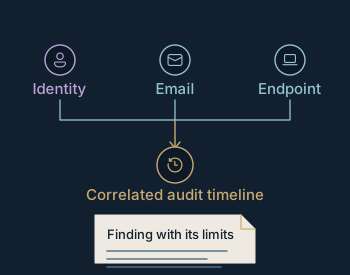
What happened, what remains uncertain, and who must act?
In scope
Scope can include Defender XDR and Sentinel setup checks, detection coverage, KQL queries and alert responsibilities. Investigations compare the available logs and state their limits.
What your team keeps
The log sources reviewed, an event timeline, findings with confidence and limitations, and response actions with named owners.
Boundary
Readiness work is separate from monitoring. No continuous monitoring, 24/7 SOC or open-ended emergency response is offered.
Illustrative evidence correlation: identity, email and endpoint signals reach one finding with its limits.
Illustrative pattern. Not a client artifact.

Endpoint control

Device setup is only the start.

A device has to remain manageable through application changes, policy updates, recovery and transfer to its operator.
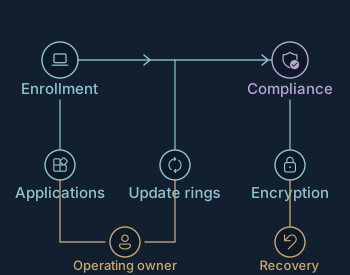
Can the device be deployed, kept compliant and recovered under named ownership?
In scope
Define Intune and Autopilot enrollment, application deployment, update groups, compliance rules, encryption recovery and support responsibilities.
What your team keeps
Enrollment and policy architecture, pilot results, application and update ownership, recovery evidence and an operating runbook.
Boundary
Endpoint work is delivered as defined projects with a documented handoff. A rollout is scoped against the actual device estate, never assumed from a device count.
Illustrative device operating model: enrollment, compliance, applications, updates and recovery connect to an operating owner.
Illustrative pattern. Not a client artifact.

Copilot & AI governance

Check what Copilot users can access.

Review sensitive files, external sharing and inherited permissions. Use the findings to define the pilot and the checks needed before more people join.
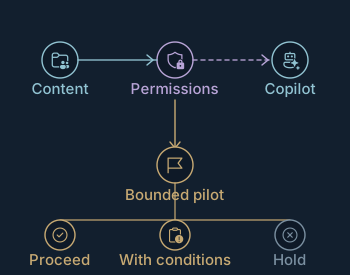
Proceed, proceed with conditions, or hold?
In scope
The agreed Copilot use case, file permissions, sensitive data, Purview requirements, guest and application access, and pilot completion checks.
What your team keeps
Exposure map, permission corrections, use-case and pilot criteria, exceptions, ownership and a recorded go/no-go decision.
Boundary
Readiness and discovery work establish the decision. They are not presented as evidence of a delivered Copilot rollout or a private AI deployment.
Illustrative readiness decision: the permission boundary determines whether the bounded pilot proceeds, proceeds with conditions, or holds.
Illustrative pattern. Not a client artifact.

How you know the work is good

Judge it by what you can inspect.

The method is written down, the sample records open and the demo can be broken on purpose. Read it the way your technical owner would.

How a project runs

A first conversation, free. An agreed scope with a named technical lead in the proposal. The price fixed in writing before we are given access. Checks before handover.

How we work
What is checked

Release checks, access test matrices and ownership maps. Constructed inspection records on the service pages show the standard before you buy.

See sample deliverables
What you keep

A System guide: what was agreed, what changed, what was tested and what remains open. With it, the scripts and check results behind the work.

Start with the business context

What has to change.
What has to keep working.

Discuss your project

Tell us why the change is needed, which systems are involved and your deadline. We say whether the project can be quoted now or needs a separately priced review first.

Your team names a sponsor to approve the work and a technical owner to coordinate it. The statement of work names our technical lead, each party’s responsibilities and the tests needed before handover.

How a project runs

First conversation free. Scope and price in writing before any access.